
One day, my fiber connection was accidentally cut. The outage quickly affected more than browsing: the televisions stopped working because their streaming services needed an internet connection. I switched to 4G LTE as a temporary backup, but at my location it reached only about 10 Mbps. That might be enough for one television, but it was not enough for two or three televisions streaming while family members were also using computers.
That experience made the problem clear: 4G LTE was not a dependable backup for the way our household uses the internet. I started looking at 5G instead.
Choosing a 5G router
While shopping, I found an AIS bundle featuring the Tozed ZLT X100M Pro 5G Home WiFi. The router is made by Tozed Kangwei. The model appealed to me as a dedicated mobile broadband connection that could be connected to the existing home network.
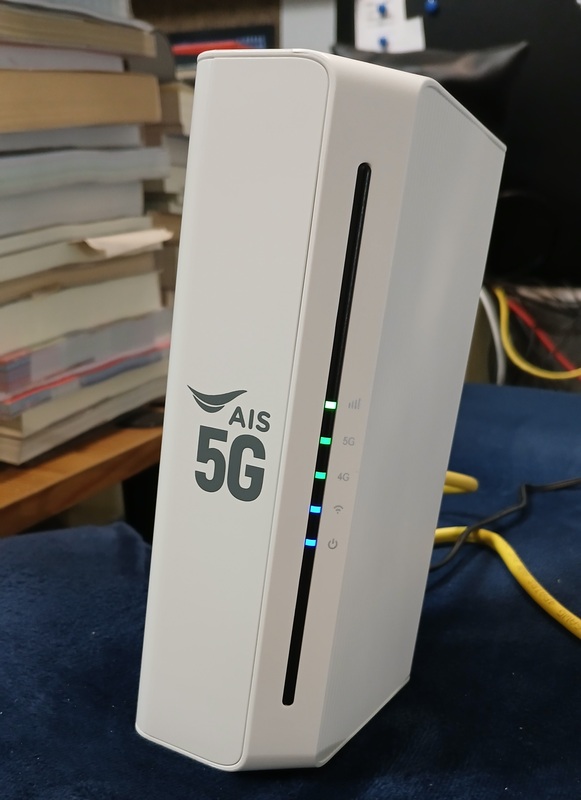
Although I found it through AIS, the unit is not SIM-locked. I tested it with SIM cards from both AIS and TrueMove H, so the router can be used with either provider, subject to coverage and service at the location.
What the router offers
The listed specifications describe a router supporting 3G, 4G, and both standalone (SA) and non-standalone (NSA) 5G. Its listed radio bands are:
- 3G: 900 and 2100 MHz
- 4G FDD: 700, 900, 1800, and 2100 MHz
- 4G TDD: 2500 MHz
- 5G FDD: 700, 900, 1800, and 2100 MHz
- 5G TDD: 2500 MHz
Inside, it uses a Unisoc V510 chipset and a dual-core ARM Cortex-A55 processor, with 256 MB of ROM and 256 MB of RAM. Wireless networking supports 802.11 a/b/g/n/ac/ax over both 2.4 GHz and 5 GHz, with 2×2 Wi-Fi MIMO. The product listing says it can support up to 32 connected devices.
The router has one nano-SIM slot, a USB port, and one LAN/WAN port, plus five indicator LEDs for power, Wi-Fi, 4G, 5G, and signal strength. It supports SMS, but not MMS. The listed 5G MIMO configuration is 1T4R on other bands and 2T4R on n75. The product information describes AIS 4G Advance and AIS 5G SA speeds; actual results depend on the network, signal, plan, and local conditions.
Speed tests: results depend on the network
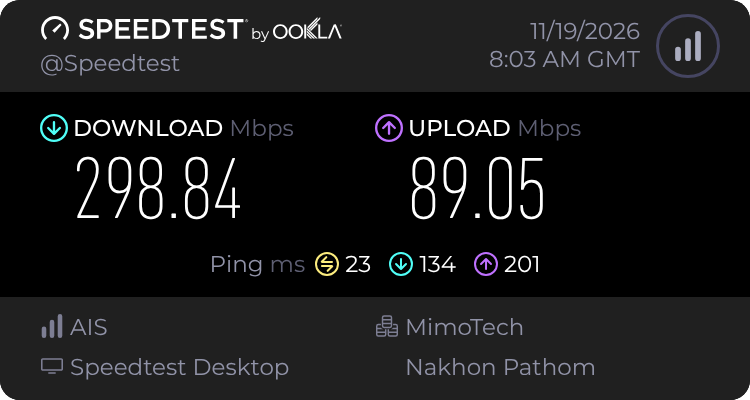
I recorded two Speedtest results at the same location, one with each carrier. With an AIS SIM, the test on November 19, 2026 showed 298.84 Mbps download and 89.05 Mbps upload, with 23 ms ping. The screenshot identifies AIS as the provider and MimoTech in Nakhon Pathom as the test server.
With a TrueMove H SIM, the test on November 27, 2026 showed 291.64 Mbps download and 33.78 Mbps upload, with 31 ms ping and 7 ms jitter. The screenshot identifies TrueMove H as the provider and shows a TrueMove H test server in Bangkok; the test used an SM-A156E device.
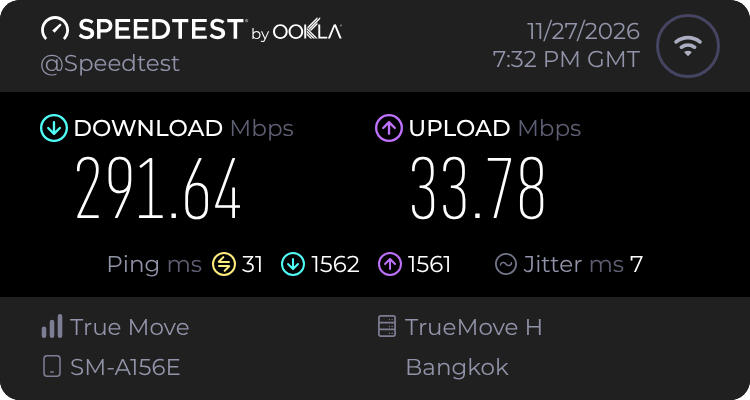
Both tests were run at the same location, but on different dates and against test servers in different provinces: Nakhon Pathom for the AIS result and Bangkok for the TrueMove H result. The comparison therefore reflects the results from those particular tests, including their different server routes; it is not a controlled carrier comparison. Download speeds were similar in these tests: AIS recorded 298.84 Mbps and TrueMove H 291.64 Mbps. AIS had the higher upload result, at 89.05 Mbps compared with TrueMove H’s 33.78 Mbps. I would check performance at home and at the times the connection is most needed before choosing a SIM for backup service.
How it fits into the home network
The plan is to keep the fiber connection as the primary internet service and connect the 5G router as a backup WAN source on the MikroTik router:
Primary connection:
AIS fiber → ONT/ONU → MikroTik router (ether1) → home network

Backup connection:
5G Home WiFi (ZLT X100M Pro) → MikroTik router (ether2)With the two internet sources connected to separate MikroTik Ethernet ports, the home network can be configured to use the 5G connection when fiber service is unavailable. This setup is intended to keep streaming televisions and household computers online during a fiber outage, provided the mobile network has enough capacity at that time.
A practical backup, with a location-specific caveat
The fiber outage exposed how limited a 10 Mbps 4G connection could be for a busy household. A 5G router offers a more promising backup option, and the AIS test result demonstrates that much higher speeds are possible in at least one tested location. The TrueMove H result also shows that the experience can differ sharply between networks and places.
For my home, the important test is not the router’s headline capability but the mobile signal and throughput where it will actually be installed. Still, a SIM-unlocked ZLT X100M Pro connected to the MikroTik router gives me a way to add a second internet path and make the household less dependent on a single fiber line.
Product references
Writing & Editing Note: All hands-on testing, hardware setup, speed measurements, and technical analysis in this post are my own. ChatGPT was used to help structure the outline and draft initial phrasing, with final edits completed by me.